
Understanding your offer and the support available to you
We have introduced a new customer support model for Transmission connected customers, designed to provide a more consistent experience throughout the offer review and acceptance process.
Your offer reflects the strongest feasible position based on engineering assessments carried out as part of the programme. Below, we outline the options available to you once you receive your offer, how to raise queries, how to request changes, and the support you can expect during this period.
To see when you can expect your offer, please visit our timeline page.
Distribution connected customers should continue to engage with their DNOs for support, and we will do all we can to assist our DNO partners with any joint queries. Connected customers should continue to engage with their DNOs for support.
While we are working to issue offers as quickly as possible, we cannot provide additional tailored support beyond what is outlined below. Thank you for your understanding.

Customer support: your new support model
We have introduced a new, centralised support model to give you clear and consistent guidance during the offer review period. Instead of a named contract manager, you will now be supported by a dedicated team who work to defined service levels. This approach ensures faster routing of queries, better coordination with Transmission Owners, and a more reliable, scalable service for all customers.

What you can expect from the customer support model
- A single, clear route for raising queries and change requests
- Defined response times for allowable changes and error investigations
- A dedicated resource pool able to assign the most appropriate expert to your query
- Better consistency and transparency across all customers and projects
This model ensures that you receive timely, accurate support, and that your project progresses in line with the joint programme timelines.
Important points to note
In order for us to respond quickly and accurately we request that all contact is made via the portal.
Please include your application number in all correspondence and try to select the applicable categories detailed below so that your query gets through to the correct team as quickly as possible.
Reviewing your offer
Please read your transmission offer carefully as soon as you receive it.
You have 90 calendar days to accept.
If your offer comes from the DNO they will have already performed some of the contractual checks on your behalf and will liaise with us directly where required. They will confirm any response timelines for acceptance with you.
We do not have the ability to extend this time period. If you do not sign within this period, you will be offered a Gate 1 Agreement to Vary (ATV).

Raising a query
Please complete one of the relevant feedback proformas to raise queries in relation to your offer.
Once completed, please submit the proforma in the Connections portal with the subject: [Project Name] - [Offer Number] - Post Offer Queries
Options available to you when you receive your offer
- Sign & accept your offer
- Allow the offer to lapse
- Reject the offer and move to Gate 1
- Raise a query regarding an error in your offer
- Raise a technical query (related to allowable changes at this stage of the process)
- Request a change to forward milestones MI5 to MI8
- Change your connection date if your project has been advanced
- Other actions that you can take
- Request a decrease of CEC, TEC, Developer Capacity, Demand MW or Installed Capacity
- Remove a tech type
- Novation
- Address details or admin changes
- Terminate
These next steps refer Gate 2 and split offers .
If you are satisfied with your offer, you can sign and accept it within your acceptance window. Once accepted, your project will move forward to the next stage.
If you do not sign your Gate 2 offer within the acceptance period your offer will be rescinded, and you will be reissued a Gate 1 ATV offer. Note that we are prioritising Gate 2 offers, and so timescales for receiving an updated Gate 1 ATV may be longer. However, we will do this as soon as we able to support the securities return process.
As stipulated in Connection and Use of System Code (CUSC) Section 18, if a customer elects not to accept the Gate 2 Modification Offer, a Gate 1 Agreement to Vary will be issued by NESO. Execution of this Agreement will initiate the process for releasing and returning any associated security arrangements. Further information can be found in CUSC Section 18.12.3.
Upon receipt of your Gate 2 offer you may opt to reject this offer and revert to a Gate 1 offer.
As stipulated in CUSC Section 18, if a customer elects not to accept the Gate 2 Modification Offer, a Gate 1 Agreement to Vary will be issued by NESO. Execution of this Agreement will initiate the process for releasing and returning any associated security arrangements. Further information can be found in CUSC Section 18.12.3.
Please send these within 4 weeks of receiving your offer.
If you believe there is an error or something does not look correct in your offer, you must raise a query within 4 weeks. Note that you must still accept your offer within the 90-calendar day window.
If your query relates to a Gate 2 offer, select "Gate 2 Offer" as the case reason. Likewise, select "Gate 1 offer" for queries about Gate 1 Offers.
Need to query or request a change?
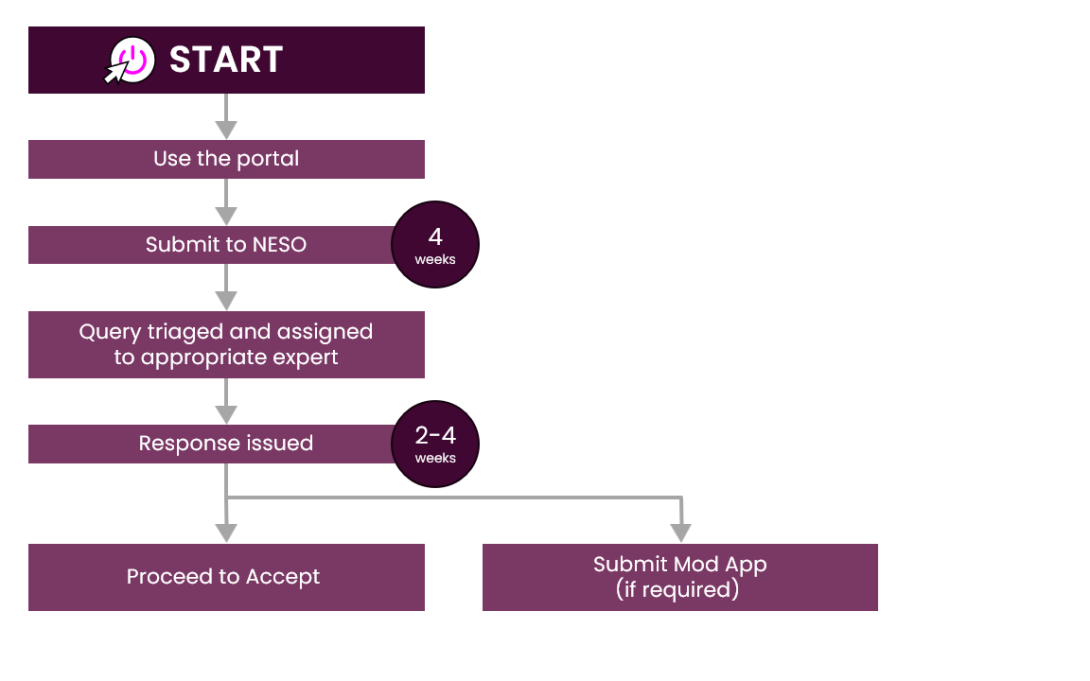
– i.e. an allowable change to your contract at this point in the process. (within 4 weeks of receiving your offer)
Some parts of your offer can be changed and others cannot. Some changes can only be made later in the process once your offer has been accepted, via modification applications and/or during future application windows.
Note if you need to make both an error query and a technical query, please submit both of these in the same query via the portal so that we can ensure all changes are captured and included in a new offer as quickly as possible.
All change requests must be submitted within 4 weeks of receiving your offer.
Request a change to forward milestones M5 to M8
These are the only milestones that can be updated. Please make any changes through the portal, specifying want to amend and which milestone it relates to.
For more information on milestone flexibility, please see this webinar.
Change your connection date if your project has been advanced
You can only request a change to your connection date if you project has been advanced. You can request a change to move back to the original connection date. No other date changes can be requested. Please raise date changes requests for advanced projects via the portal.
Need to query or request a change?
During this time there are a number of standard processes that you can also undertake.
Request a decrease of CEC, TEC, Developer Capacity, Demand MW or Installed Capacity
This can be completed by submitting a non-gated mod app. The period to accept your offer will not be extended while you complete this process. If you need to do this, contact us via the portal and we will support you.
Remove a tech type – replanning for directly connected transmission project
This can be completed by submitting a non-gated mod app. The period to accept your offer will not be extended while you complete this process. If you need to do this, contact us via the portal and we will support you.
Novation
Novations can be submitted at any time if the ownership of the project changes. Please contact us via the portal and we will process your novation.
Address details or admin changes
Offers will be sent to your nominated commercial contact. If you wish to make any changes to your contact details you can do this via the portal.
Terminate
You can request a termination which will mean that neither a Gate 2 or Gate 1 offer will be made and you will be unable to progress a connection. All terminations are subject to a termination fee.
Customers requiring an extension to their offer signing deadline (<2028 1 and 2a* protected)
- For customers who are part of the re-offer process, where material errors have been identified in an initial offer and further work is required by NESO and/or TOs to issue an updated and accurate offer, a four-week extension to the signing deadline will be granted to all affected customers [subject to NESO first agreeing a corresponding extension to the offer to NESO from the TO(s) if and where required].
- Where customers have extenuating circumstances that require additional time beyond this four-week extension, or where an extension could in rare cases be required for reasons other than a reoffer due to material errors, requests will be considered on a case-by-case basis.
Customers are encouraged to review their offers as fully as possible within the first 4 weeks of having received it, even if they are likely to require a re-offer. For example, if there are minor issues which are preventing signing, we encourage you to use the time available now so that you are in a position to sign promptly once any outstanding points are resolved.
If you wish to request an extension to your signing deadline, please raise this through the Connections Portal.
This information applies to NESO customers only, including DNOs. Customers whose offers are being issued and managed directly by their DNO should contact their DNO to confirm their applicable signing deadlines.
Moving from Gate 2 to Gate 1 - Customer guidance
Following customer feedback, we have introduced a template for customers with projects with a Gate 2 status who wish to change it to a Gate 1 status and receive a Gate 1 ATV ‘early’, i.e. before receiving a Gate 2 Modification Offer or the expiry of its acceptance period.
To make this request, submit a query through the portal using the case reason ‘Gate 2 Offer Rejection Request’ against your project, and attach the template on your company letter-headed paper. This must be signed by a company Director.
Please note that this letter will be shared with the relevant Networks for their records.
Once we have actioned this request, we will let you know before issuing a Gate 1 ATV as soon as reasonably possible. Once the Gate 1 ATV is signed and we receive your bank evidence, we will process your security refund.
If your project is connecting to the distribution network, contact your DNO or IDNO who will handle the request on your behalf and manage the process of refunding/cancelling any secured sums.
For further information see this guide.
Modification Application scoping exercise update
Thank you to everyone who contributed to the Modification Application change scoping exercise. We received 530 responses, providing valuable insight into the types and volume of changes customers are considering.
The information gathered will help inform our approach. However, given the volume of responses, we need additional time to complete a thorough review and analysis.
The findings will help us assess potential options ahead of future gated windows, whilst being mindful of the impacts on the current offers process and timelines.
Any resulting decision will be considered across the wider connections landscape and will be transparent and agreed by all Network parties.
We will look to update all customers with further information in the coming weeks.
Deadline 10 July 2026
Through our engagement with you, we have heard that projects may have evolved over this period and that some of you may be considering changes that are difficult to progress within existing processes.
To support this, we launched a Mod App change scoping exercise on 24 June 2026.
We are aware that CUSC modifications are currently being processed, and we believe this exercise supports this in covering the entirety of changes.
This is for customers who have received a Gate 2 notification, whether or not you have received your offer. It provides you with an opportunity to tell us about any changes you are considering. This includes changes that would typically be progressed through Modification Applications, whether under gated or non-gated processes.
As the date of the next window is not yet set, this exercise aims to build a clearer, evidence-based understanding of:
- the types of changes customers are considering
- the scale and volume of potential modification requests
- how we can best support customers to progress their projects while maintaining a fair and workable process
At this stage, this is for information gathering only and will be done through a Microsoft Form. Submitting your details:
- does not constitute a formal Modification Application
- does not guarantee that any changes can or will be processed
- will not affect your current position or existing agreement
We will use the insights gathered to assess what may be feasible and sustainable ahead of future gated windows, and to ensure any next steps are informed by customer need.
This is intended as a one-time scoping exercise to understand the scale of requested changes, so customers must tell us now if they wish to make a change. Any requests made later cannot be incorporated outside of the usual mod app process.
If you would like to take part, please complete this form by 5pm on Friday 10 July 2026
Modification Application change scoping exercise form
We encourage you to provide as much detail as possible. We will review the responses collectively and provide an update once we have assessed the findings.
A webinar recording covering many common questions on the topic can be found on our webinars and archive page.
Guidance Video
Thank you for your questions on the Mod App scoping exercise. To help, we have recorded a guidance video (around 30 minutes), covering the purpose of the form and how the information you provide will be used.
Take a look at the accompanying slides
NOTE: This text was updated on 3 July 2026 to give greater clarity on the purpose of the Mod App scoping exercise.